San Diego Web Cams Live (Rotating/Switched Feed)
421,567 View

- Publish Date:
- November 28, 2022
- Category:
- Pearl Harbor
- Video License
- Standard License
- Imported From:
- Youtube
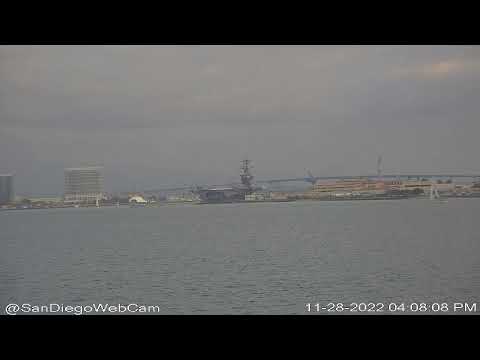
This switched feed presents all of our live cameras with views of Downtown San Diego, San Diego Bay and the Pacific Ocean from cameras located at Bali Hai on Shelter Island, Tom Ham's Lighthouse on Harbor Island & Cabrillo National Monument on the southern tip of Point Loma.
Audio is a VHF marine radio channels & occasionally NOAA as warranted.
This will be the feed to watch when a ship is coming or going or any other event we are following and you don't want to chase it over our YouTube channel. You can safely park it here and let us do the work for you.
CHAT: No political or religious talk, please. It's too polarizing. We want this feed to be enjoyable for everyone. Keep it family friendly. You must subscribe to chat. This is not the same as "JOIN", which is a paid membership to support the channel. You merely need to "SUBSCRIBE" to chat. This is to help reduce chat spammers.
To keep everyone safe, DO NOT discuss future ship movements in chat until they have been made public by this channel.
Thank you
=====
Chat Bot Commands:
!whois-xx
where xx is a ship number. i.e. !whois-70
Will tell you about warship 70.
!weather - weather report
!fireworks - fireworks schedule
Can play fetch too. Ask Guy to show you.
If you find the bot annoying then block it in your chat feed. Click to the right of it and block. You can (and should) block any source in the chat you find annoying.
=====
Members can now control our 4K cams and switched feed video via chat commands! As we add new 4K cameras, they will support this feature too.
=====
Changing the switched feed display
To change the switched feed display, use !show [cam]
All cameras can be displayed on the switched feed. They are:
CVC - Cabrillo National Monument (Visitor Center)
CW - Cabrillo National Monument west facing camera
SIE - Shelter Island East (Bali Hai Restaurant)
SIN - Shelter Island North (Bali Hai)
HIS - Harbor Island South (Tom Ham's Restaurant)
HIE - Harbor Island East (Tom Ham's Restaurant)
AUTO - Resume auto rotation
i.e. !show cvc will show the CVC camera in the switched feed
!show auto will resume normal automatic rotation
=====
Moving the 4K cameras
The two 4K cameras that can be moved are:
SIE : Shelter Island East
CVC : Cabrillo Visitor Center
Commands format:
* * To move the camera * *
!move [cam] [location/direction] [step]
examples: "!move sie buoy21" will point the Shelter Island 4K camera towards buoy 21.
"!move sie up 8" will move the Shelter Island 4K camera up 8 steps
"!move cvc right 3" will move the Cabrillo 4K camera right 3 steps
* * To zoom the camera * *
!push [cam] [1-25]
examples: "!push sie 25" will zoom IN the Shelter Island 4K camera 25 steps
!pull [cam] [1-25]
examples: "!pull cvc 5" will zoom OUT the Cabrillo 4K camera 5 steps
These features are new and will continue to be refined. Supported locations are:
From all 4K: up, down, left, right
Camera specific locations (!move [cam] [location]:
From SIE:
tour (starts the tour)
wide
fueldock
harborisland
adminbuilding
starofindia
downtown
midway (or cv41)
sunrise
vinson
cruiseship
outbound
inbound
buoy17
buoy18
buoy19
buoy20
buoy21
north
east
From CVC:
tour
daytour
nighttour
lighthouse
ftrosecrans
bait
bridge
hoteldel
flagpoleonright
ammopier
fuelfarm
seaworld
seaworldfireworks
sunset
sunrise
northwest
west
south
buoy1
buoy2
buoy3
buoy4
buoy5
buoy6
buoy7
buoy8
buoy9
buoy10
buoy11
buoy12
buoy13
buoy14
buoy16
buoy17
buoy18
buoy19
buoy20
buoy21
north
statue
outbound
inbound
breakersbeach
myamadea
zunigav
zunigaw
zunigax
zunigay
zunigaz
ibpier
Enjoy!
===
The San Diego Web Cam is 100% viewer supported. Your stars, superchats, memberships, merchandise purchases and donations make this possible. Thank you for your Support!
--Watch the San Diego Web Cam 24/7 on:
YouTube: www.SunDiegoLive.com
Facebook: https://www.facebook.com/SanDiegoWebCam
Twitch: https://www.twitch.tv/sandiegowebcam
Instagram: https://www.instagram.com/sandiegowebcam/
--Follow @SanDiegoWebCam on Twitter/YouTube/Facebook/Instagram
--How to support the San Diego Web Cam:
Facebook $1.99/month https://www.facebook.com/becomesupporter/235900079905310
YouTube 99 cents/month https://www.youtube.com/channel/UC88QpAaX8sdqm1fWYSjzbSQ/join
Merchandise https://bit.ly/3rBjr4M
Amazon! Now you can support the San Diego Web Cam while you shop at Amazon. Just click this link to visit the site before you purchase: https://amzn.to/3nkQY1h Thank you!
Financial contributions (paypal): https://www.paypal.com/donate?hosted_button_id=3Z9DJYBKYTTEU
THANK YOU
San Diego WebCam
San Diego Cam
San Diego Live
San Diego Live Cam
#SanDiego #Live #camera #view #webcam
News media: Rebroadcast for ANY reason requires a paid license. Message us on Facebook or Twitter, or email [email protected].